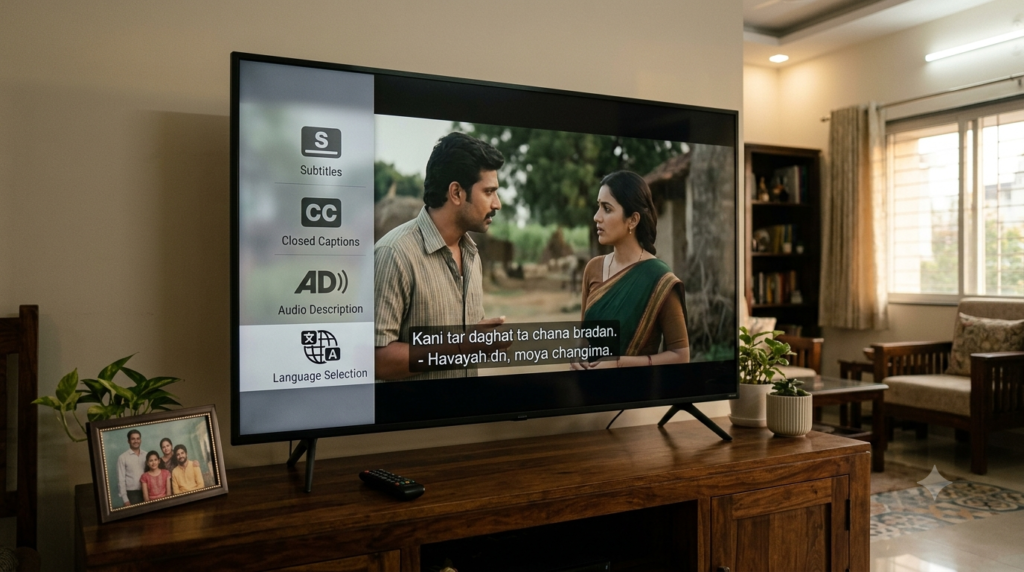
Telugu Movie Subtitles: SDH, Audio Description & OTT Settings
Telugu movie subtitles can help you follow a film, but they do not always provide the same access as SDH captions or audio description. A language menu might offer English dialogue text while leaving out the sound cues a deaf viewer needs. It may also lack spoken scene descriptions for someone with low vision.
The useful question is not simply whether a Telugu film has subtitles. It is which language and accessibility tracks your particular streaming copy offers, and whether your device can play them.
Telugu Movie Subtitles at a Glance
- Regular subtitles usually show speech, often translated from Telugu into English or another language.
- Closed captions and SDH can also identify speakers and describe meaningful sounds, such as a ringing phone.
- Audio description (AD) adds spoken details about visual action, expressions and scene changes.
- Availability is title-specific. A platform may support a feature even when one Telugu film does not include its track.
- Check before paying. Use the official title page and playback menu rather than an unverified subtitle claim.
Subtitles vs SDH vs Audio Description: What Changes?
For Telugu movie subtitles, the first distinction is between translated dialogue and fuller accessibility captions. Standard subtitles mainly help you understand spoken words. Subtitles for the Deaf and Hard of Hearing (SDH) add non-speech information that dialogue alone cannot convey. Audio description serves a different need: it tells listeners about key action that otherwise appears only on screen.
The World Wide Web Consortium (W3C) explains these distinctions in its captioning guidance and audio-description guidance. Streaming services may use slightly different labels, so examine the actual track rather than the icon alone.
| Feature | What you receive | Most useful when |
|---|---|---|
| Translated subtitles | Dialogue in another written language | You do not understand spoken Telugu |
| Same-language captions | Telugu speech shown as Telugu text | You want to read along with the dialogue |
| CC or SDH | Dialogue plus relevant sound and speaker cues | You cannot hear all important audio |
| Audio description | Spoken narration of key visual events | You cannot see all important action |
These features can overlap, but they are not interchangeable. A film can offer English subtitles without offering English SDH. Likewise, Telugu audio does not imply Telugu audio description.
What makes an SDH track different?
Imagine a suspense scene in a Telugu thriller. Ordinary English subtitles might translate an actor’s warning. SDH may also show cues such as “[door creaks]” or identify an off-screen speaker, when those details matter to the story.
Those additions matter because viewers may miss plot information without them. However, an SDH label is not a guarantee of perfect quality. Check timing, speaker identification and meaningful sound cues during a short sample.
Can regular Telugu captions still help?
Yes. Same-language Telugu captions can support reading, language learning and watching in noisy rooms. They may also help people who hear some dialogue but miss fast speech. Yet they may not include everything an SDH track should convey.
Translation brings another choice. English subtitles can help a non-Telugu-speaking viewer, while Telugu SDH may better serve someone who follows Telugu but needs sound cues. Choose the track for the actual viewer, not just the film’s original language.
How to Check Telugu Movie Subtitles Before Streaming
To verify Telugu movie subtitles, open the film’s official listing first, then examine the language and accessibility details. If the platform allows a preview or playback, inspect its subtitle and audio menus as well. A generic claim such as “subtitles available” is not enough to identify the language, SDH format or audio-description track. For a wider view of services, browse Movieshala’s Telugu OTT guide, then confirm the chosen film’s tracks on its official platform.
- Find the exact title. Match the film name, release version and language on the official service.
- Open its details page. Look for listed audio languages, subtitle languages or accessibility badges.
- Check the text-track label. Look for Telugu, English, CC or SDH rather than assuming they mean the same thing.
- Check audio separately. Look for a track explicitly labelled Audio Description or AD.
- Test a scene. Confirm that text appears on time, and listen for spoken description if you selected AD.
- Repeat on your intended screen. A phone, browser and smart TV can show different controls or supported features.
If access requires payment, check the details page and platform help before buying. When the listing omits track details, do not assume a paid plan will unlock them. A track has to exist for that particular release.
Netflix: Find Subtitles, SDH and AD for Telugu Films
For Telugu movie subtitles on Netflix, viewers can inspect available languages during playback through its Audio & Subtitles controls. Its help centre also explains that an SDH badge may appear on a title’s details page. Some films and episodes do not carry SDH even when regular dialogue subtitles exist.
Start a Telugu title, open the player controls and select Audio & Subtitles. On a phone or computer, tap or click the screen; on many TVs, use the remote’s direction keys. Next, select a subtitle language and check the separate audio-track list.
For audio description, look for the words “Audio Description” next to an audio language. Netflix explains the feature in its official AD guide. A film with English subtitles does not automatically offer described audio in English or Telugu.
Why does Netflix show fewer languages on a download?
Netflix says that downloaded titles may display only the two most relevant language options. Streaming can expose a wider set on supported devices. Therefore, compare the streaming menu before deciding a language track is missing.
Profile language, viewing region, the title and the device can also affect options. Netflix lists these reasons in its language availability explanation. If a described track streams but disappears in a download, check Netflix’s download troubleshooting steps before downloading again.
Prime Video: Check Telugu Movie Subtitles and Audio Tracks
Telugu movie subtitles on Prime Video sit alongside captions and audio description on supported content. Yet its official connected-device subtitle instructions stress that features depend on the title and device. Do not interpret Prime Video’s overall accessibility support as a promise for a specific Telugu film.
On a smart TV or connected player, start the film and open the subtitle or caption icon in the playback menu. Choose an available language, then check the audio selection separately for alternative tracks or AD. Controls may differ on browsers, Fire TV devices and mobile apps. For a film-level example, see Movieshala’s Leader OTT release guide, then check the live Prime Video listing for current track options.
Prime Video may offer text-size or colour options on supported devices. That can make English subtitles easier to follow from a sofa. However, a larger font cannot turn dialogue-only subtitles into SDH, and an audio-language switch cannot create missing description.
Apple TV: Read the CC, SDH and AD Labels
When comparing Telugu movie subtitles across stores, Apple provides a useful way to check availability before viewing. Its accessibility-feature guide says that title pages may display CC, SDH and AD labels. It also directs viewers to the Languages section for supported languages.
Search for the Telugu movie in the Apple TV app and open its description page. Check the features and their languages, then confirm the actual track during playback. Availability varies by country, title and device, so an icon alone does not settle every question.
Apple also documents a Closed Captions + SDH preference under device accessibility settings. Turning that preference on helps prioritise suitable captions where offered. It does not add SDH to a movie that has no SDH track.
YouTube: Captions and Auto-Translation Need Extra Checking
Telugu movie subtitles also matter for films, clips and official trailers on YouTube. If a video offers captions, its player shows a CC control. You can open the settings menu to choose an available language and, for eligible videos, use auto-translation.
However, automatic captions can miss names, local expressions and dialogue beneath music. Translated text may carry those mistakes forward. Use YouTube’s caption settings guide to find the controls, but do not treat machine-generated text as verified SDH.
For important scenes, manually check whether speech is accurate and whether sound cues appear. A CC icon only establishes that the player offers a caption option for that video. It does not prove that the captions meet every accessibility need.
How to Choose the Right Track for Each Viewer
Families selecting Telugu movie subtitles can have different needs, even when everyone chooses the same film. The quickest way to decide is to name the information a viewer would otherwise miss. Then select the track that supplies it and test one scene.
- Viewer who does not speak Telugu: Check for an accurate English or preferred-language subtitle track.
- Deaf Telugu-speaking viewer: Prefer Telugu SDH or full same-language captions that include sound and speaker information.
- Deaf viewer who prefers English: Check for English SDH rather than English dialogue-only subtitles.
- Blind or low-vision viewer: Look for an AD track in a language the viewer understands.
- Family using a TV in a noisy room: Same-language captions may be enough, although SDH supplies more context.
Two tracks can be useful at once when a service supports that combination. For example, one person may listen to the original Telugu audio while another reads English text. Still, check which functions can run together on the device.
Making Telugu Movie Subtitles Easier to Read
Good Telugu movie subtitles should remain readable without hiding important on-screen action. A suitable language is only the first step. Text size, contrast, placement and timing also affect whether someone can follow a fast dialogue scene.
Check the player or operating system for caption appearance controls. Some services let you adjust text size, colour or background, while others rely on device settings. YouTube documents these controls for several devices, and Apple supports caption styles on compatible hardware.
- Increase font size until it remains clear at your normal viewing distance.
- Choose strong contrast, especially during bright outdoor scenes or dark fights.
- Avoid styling that covers faces or on-screen Telugu text.
- Check whether subtitles lag behind speech after skipping forward.
- Compare the same scene on another screen if lines are cropped or missing.
For families, set these preferences before the film starts. Changing them during a busy scene can interrupt viewers who depend on the text. Also remember that accessibility settings cannot fix inaccurate translations at their source.
When Telugu Movie Subtitles or AD Are Missing
A missing option does not always mean the streaming service has stopped supporting subtitles. First establish whether the track exists for that title. Then distinguish a content limitation from a device, account or download issue. Movieshala’s Maremma OTT language guide shows why direct platform information and reported language options need different levels of trust.
- Check the exact film page again. A dubbed version or different listing may have different track information.
- Inspect every language choice. Netflix may place extra languages under an additional menu, depending on device.
- Switch to streaming. If you downloaded a Netflix title, compare its streamed audio and subtitle options.
- Try a supported alternate device. Some language features do not work equally across older TVs and mobile apps.
- Review account language preferences. Change them through the platform’s official settings where available.
- Contact the platform through its official help centre. Include the title, device and missing track label in your report.
None of these steps guarantees a missing track will appear. If the provider has not supplied English SDH or Telugu AD for that title, a settings change cannot manufacture it. Your practical fallback is to choose another legally available release with a confirmed suitable track.
What if an SDH badge appears but the sound cues do not?
Check that you selected the SDH-labelled track rather than a similarly named dialogue subtitle option. Next, test scenes with clear music, sound effects or off-screen speech. A track may have weak coverage despite its label.
If the problem remains, report the title and approximate scene through the official app. Describe the missing information rather than claiming the whole service lacks accessibility. That gives the support team a clearer issue to assess.
What if audio description works on mobile but not on TV?
Open the TV app’s audio selector and check the available tracks. Then review the device’s accessibility settings and Prime Video, Netflix or Apple instructions for that device. The menus may not mirror the mobile app.
When possible, test the same title while streaming on another supported screen. If the track remains unavailable only on one device, use official device support. If it disappears everywhere, the title’s current entitlement or track availability needs checking.
Common Misunderstandings That Waste Time
A Telugu dub is not a subtitle track. A film can carry Telugu dialogue while offering only English written text. The reverse also happens, so read audio and subtitle menus separately before choosing your viewing language.
The label “English subtitles” does not mean “English SDH”. SDH should carry meaningful non-speech cues, although quality may vary. Similarly, a generic CC button does not identify whether the available caption track is Telugu, English or machine-generated.
Audio description is not an alternative dub. A dubbed track translates speech into another language, while AD narrates important visual details. A movie can have several dubbed audio tracks and no described version.
Finally, do not rely on unofficial subtitle-download pages as proof of OTT availability. They cannot confirm the tracks licensed within your streaming app. Check the provider directly, and avoid suspicious downloads that may expose your device to risk.
A Better Way to Check Accessibility Before Subscribing
When Telugu movie subtitles guide a paid streaming choice, accessibility becomes a title-level buying question. Start with the official listing, not a general claim about the service. Then verify the precise text and audio features you need.
Make a small note of the title, platform, audio language, subtitle language, SDH availability and AD language. Record “not confirmed” if the title page lacks enough detail. This is more useful than assuming every Telugu film on the service shares a standard set of tracks.
Use the same checklist when a family member recommends a film. If that person watched it in another country or on another device, their language menu may differ. A quick track check can prevent a wasted rental or subscription decision.
Before You Press Play
Telugu movie subtitles are only one part of accessible streaming. For dialogue across languages, check ordinary subtitles. For hearing access, look closely at CC and SDH. For visual access, seek a clearly labelled audio-description track.
The safest routine is to inspect the title page, check the playback menu and test a short scene. When a track is absent, rely on the platform’s official help rather than a promise from a third-party list. Accessibility should be confirmed for the film you actually plan to watch.
Frequently Asked Questions
Do all Telugu films on OTT have English subtitles?
No. English subtitles depend on the individual title, release and service. Check the official film page or player before subscribing. A platform that supports English subtitles generally does not promise them for every Telugu film.
Are Telugu subtitles and Telugu SDH the same?
Not necessarily. Telugu subtitles may transcribe dialogue without identifying speakers or key sounds. Telugu SDH aims to include that extra information for people who are deaf or hard of hearing. Inspect the label and a sample scene.
What does SDH mean in a movie’s language menu?
SDH stands for Subtitles for the Deaf and Hard of Hearing. It usually includes spoken dialogue, important sound effects and speaker clues. The exact format and quality can vary by service and title.
Is audio description the same as dubbed audio?
No. A dub replaces or translates spoken dialogue in another language. Audio description narrates important visual information, often between dialogue lines. Look for a track labelled Audio Description or AD rather than assuming any second audio language will help.
How can I find English SDH for a Telugu movie?
Look for English SDH or a relevant accessibility badge on the official listing. Then open the subtitle selector and test the track. If the service lists only English subtitles, do not assume those captions also describe sound effects.
Why are subtitle languages different on my phone and TV?
Device support, app versions, account preferences and regional rights can affect the displayed options. Compare the same title while streaming on both devices. If one screen lacks a listed language, consult the platform’s device-specific help.
Can I turn on audio description for any Telugu film?
No. Audio description requires a described track or another supported description method for that title. Device accessibility settings can enable playback of an existing track, but they cannot guarantee one exists. Confirm its language before viewing.
Are YouTube auto-captions equivalent to SDH?
No. Automatic captions can omit sound cues and mishear Telugu speech, names or songs. They may be useful for basic understanding, but check their accuracy carefully. A proper SDH track should convey key non-speech information too.