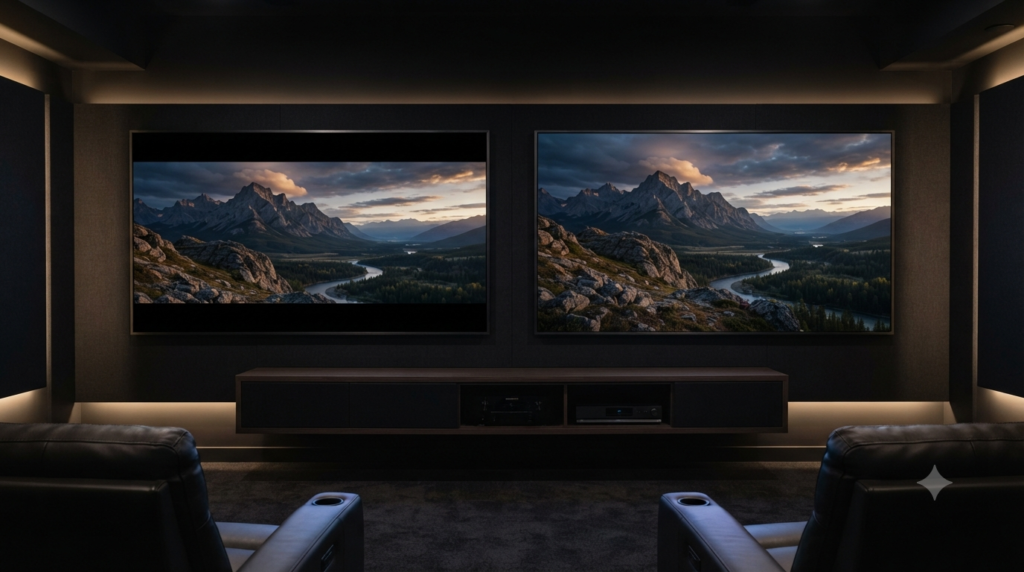
Cinema Aspect Ratio: Screen Shapes, Black Bars and Cropping
Cinema aspect ratio tells you the shape of a movie image, not how sharp or smooth it looks. A wide film may show black bars on your television because its frame is wider than the screen. Zooming can hide those bars, but it may also cut away part of the shot.
That difference matters when you watch films at home, choose a cinema screen or edit your own video. The guide below explains common formats, the reason for black borders and the trade-off between fitting and filling a display.
Cinema Aspect Ratio at a Glance
- Aspect ratio means width compared with height. A 2.39:1 image is 2.39 units wide for every unit of height.
- 1.85:1 and 2.39:1 are two established digital cinema presentation formats.
- Black bars usually preserve framing. They fill unused screen space without stretching the picture.
- Zooming trades picture for screen coverage. It often cuts off the edges of wide footage.
- Resolution and frame rate are separate. One describes pixel detail; the other describes frames per second.
What Is Cinema Aspect Ratio?
Cinema aspect ratio is the proportional width and height of a film’s visible image. A 1.85:1 frame measures 1.85 units across for each unit of height. The ratio stays the same whether you view that image on a cinema screen, a television or a phone.
To read a ratio, divide its width by its height. For example, 16:9 equals about 1.78:1. Neither number tells you how many centimetres wide the screen is, so a small display and a huge projection can share the same shape.
Filmmakers choose a frame shape to control composition. A taller frame leaves more room above and below a person, while a wider one can place several characters across a landscape. Neither shape is automatically more cinematic.
Common Cinema Aspect Ratio Formats Compared
Several cinema aspect ratio formats appear across film history, streaming and television. The names sometimes overlap, so the numerical width-to-height relationship is the clearest reference.
| Ratio | Shape or common use | On a 16:9 TV |
|---|---|---|
| 1.33:1 (4:3) | Classic film and older television | Bars at the sides |
| 1.37:1 | Academy-style classic cinema frame | Bars at the sides |
| 1.78:1 (16:9) | Widescreen television and online video | Normally fills the screen |
| 1.85:1 | Theatrical Flat presentation | Very thin bars, if shown uncropped |
| 2.39:1 | Theatrical Scope presentation | Clear bars above and below |
The Digital Cinema Initiatives (DCI) compliance test plan identifies Flat as 1.85:1 and Scope as 2.39:1. It uses image areas of 1998 × 1080 pixels and 2048 × 858 pixels for the two 2K formats.
Those figures describe specific cinema delivery formats. They do not mean every film camera records in exactly those dimensions. Some filmmakers shoot with a larger image and select the final shape later. For cinema delivery and playback, see Movieshala’s guide to KDM in digital cinema.
Cinema Aspect Ratio: 1.85:1 vs 2.39:1
The practical difference between 1.85:1 and 2.39:1 in cinema aspect ratio is how much horizontal space the composition uses relative to its height. Flat is only slightly wider than a 16:9 television. Scope looks noticeably broader and often creates more room for action across the frame.
Think of a conversation at a dining table. In 1.85:1, a director may frame two faces with more headroom. In 2.39:1, the same shot could place more people side by side, although the exact result depends on camera position and lens choice.
One ratio does not guarantee better images or stronger storytelling. A tightly framed drama can benefit from Scope, while a large action scene can work in Flat. Composition is the decision; the ratio supplies the boundary.
Why Cinema Aspect Ratio Creates Black Bars
Movies have black bars when the image and display use different shapes, and the player preserves the complete frame. A wide movie on a narrower screen leaves unused space above and below. The bars let viewers see the full picture without stretching faces or cutting off edges.
This is normal behaviour, not a sign that your television has a fault. The Netflix Help Center explains that these bars protect the movie’s original format. It also notes that zooming on some devices can trim the sides.
The bars may look thicker on a phone held upright or on an older television. Meanwhile, a widescreen monitor may need little padding for the same movie. The cinema aspect ratio of the film, compared with the screen’s shape, determines the result.
Letterboxing, Pillarboxing and Windowboxing
Letterboxing places horizontal bars above and below a picture. It commonly appears when you fit a Scope movie into a 16:9 display. The full width remains visible, so no scene content needs to disappear.
Pillarboxing places vertical bars on the left and right. For example, a 4:3 classic film appears narrower than a modern 16:9 television. Preserving its shape leaves empty space at both sides.
Windowboxing leaves borders on all four sides. This can happen when a video already includes bars inside its recorded frame, then plays inside another mismatched shape. It may also reflect a poor export or playback setting.
Cinema Aspect Ratio: Fit, Fill, Zoom and Cropping
Fit, Fill and Stretch can produce very different pictures from one movie file. Fit keeps the whole frame and adds bars if necessary. Fill enlarges the image until the screen has no gaps, while Stretch changes its proportions to cover the display.
| Display choice | What you see | Trade-off |
|---|---|---|
| Fit / Original | Entire frame, possible bars | No intentional edge crop |
| Fill / Zoom | Screen covered | Edges may disappear |
| Stretch / Wide | Screen covered | People and objects may look distorted |
| Pan and scan | Selected moving crop | Parts outside the crop remain unseen |
To preserve the cinema aspect ratio, Fit or Original is usually the best viewing choice. Zoom can be useful for small-screen viewing, but it changes what remains visible. Stretch is rarely suitable because it can make circles oval and faces too wide.
Adobe’s Premiere documentation distinguishes letterboxing from pan and scan. The latter follows a selected part of the widescreen image, so picture outside that area is lost.
How Much of a 2.39:1 Film Fits on a 16:9 TV?
A 2.39:1 film fits fully inside a 16:9 television when its image uses about 74% of the screen’s height. The remaining height becomes black bars, roughly 13% at the top and 13% at the bottom. These figures assume a full-width image with no bars already inside the video.
Here is the simple calculation. A 16:9 screen is about 1.778 times as wide as it is tall. Divide 1.778 by 2.39, and the film occupies approximately 0.744 of the available height.
Now reverse the choice. If you zoom the movie until it fills the television vertically, the player can show only about 74% of its original width. Roughly 26% of the horizontal picture falls outside the screen, split between both sides if the crop stays centred.
That is a meaningful trade-off. An actor at the edge of a group shot might vanish, although the frame looks larger. The bars are often preferable because they keep the director’s composition intact.
Cinema Aspect Ratio vs Resolution: Shape Is Not Sharpness
Cinema aspect ratio describes shape, while resolution describes the number of pixels that form an image. A 1920 × 1080 video and a 3840 × 2160 video both have a 16:9 ratio. The second contains more pixels, yet neither is wider in proportional terms.
Think of a photograph printed in two sizes. Its proportions can remain identical while the amount of detail changes. Likewise, a 4K film can still show black bars because extra pixels do not change the shape of your display.
Resolution alone also cannot guarantee a sharper picture. Compression, focus, source quality and screen size affect what viewers notice. Adobe’s aspect ratio explainer makes the core distinction between proportions and pixel dimensions.
Does 4K Mean the Same Thing in a Cinema and on a TV?
No. The familiar television format called 4K UHD measures 3840 × 2160 pixels and has a 16:9 shape. A digital cinema 4K container can measure 4096 × 2160 pixels, while its visible Flat or Scope image uses a different active area.
The distinction matters when you compare files or set up a projection workflow. A file’s pixel dimensions, the active image and the physical screen can each have different proportions. Check all three before changing your export settings.
Cinema Aspect Ratio vs Frame Rate: Shape Is Not Motion
Cinema aspect ratio controls the boundaries of each picture, while frame rate controls how many pictures appear each second. A 2.39:1 movie can play at 24 frames per second or another rate. Its frame remains equally wide, although the motion may look different.
Frame rate uses the unit fps, meaning frames per second. Traditional narrative cinema often uses 24 fps, while 30 fps and 60 fps serve other video needs. The Adobe frame-rate guide explains how these rates change the feel of motion.
Neither frame rate nor aspect ratio directly measures image detail. A video can be wide but low resolution, sharp but narrow, or smooth in motion with bars still visible. Keeping the three concepts separate helps you diagnose what actually needs changing.
Do Anamorphic Lenses Automatically Mean 2.39:1?
No. Anamorphic describes an image capture or projection method, not one compulsory final ratio. An anamorphic lens squeezes a wider field onto a recording area; the image later needs the correct horizontal expansion. Filmmakers can then crop or frame that result in several ways.
Scope often has an anamorphic history, which explains the association. Yet digital films can reach a 2.39:1 final frame through ordinary cropping or other capture methods. A widescreen look alone does not reveal which lens produced it.
This distinction matters for editors. If footage looks strangely thin or wide, check whether the clip needs a desqueeze setting before applying any crop. Cropping a squeezed image first can make framing decisions unnecessarily difficult.
Why Does a Movie Change Shape During Certain Scenes?
Some films deliberately switch aspect ratios between scenes or sequences. A shift from a wide frame to a taller one can show more space above and below the subject. On a television, the black bars may grow or shrink as those changes occur.
That does not automatically mean your streaming player has malfunctioned. The different shapes may be part of the version the distributor supplied. However, an alternate home release might use a different framing from a theatrical release, so both can be legitimate presentations.
Do not assume a taller image always reveals more of the same camera negative. It might show extra photographed area, use another crop, or come from a separate composition. The intended version matters more than any simple rule about which shape is best.
Does the Cinema Aspect Ratio Match the Screen?
Not always. Cinemas use screens, curtains, masking and projection settings that accommodate different film shapes. A well-matched presentation can make a Scope film look almost wall-to-wall, while Flat may use a different portion of the screen.
Digital Cinema Initiatives describes image framing for both Flat and Scope in its technical tests. Yet an individual auditorium’s masking and projection geometry determine what an audience actually sees. You therefore cannot identify a film’s native ratio from the screen shape alone.
If a picture seems clipped at the edges, look for missing credits or subtitles before assuming the format is wrong. The problem might be projector alignment rather than the film’s intended composition. Cinema staff can assess an obvious presentation fault. Screen size and layout also affect the viewing experience, so consult Movieshala’s cinema seat selection guide when comparing auditorium seating.
How to Fix Unwanted Black Bars Without Losing the Picture
Black bars are normal when a movie and screen have different shapes. You can remove them with zoom, but that often crops the image. To preserve the complete film, start with the player’s Original, Fit or Auto display setting and check whether the bars match the content.
- Check the source. Try another movie or scene, since different titles may use different ratios.
- Restore the display mode. Choose Original, Fit, Auto or Screen Fit, depending on your device.
- Turn off forced zoom. Then check whether faces and subtitles return to their proper positions.
- Check the video file. Bars may already exist inside an exported image, so TV settings cannot recover removed content.
- Investigate unusual borders. Bars on every side may point to a mismatch between the file, player and screen.
The outcome is not guaranteed because some apps lock their playback controls. A film may also include permanent borders or a fixed crop. In that case, use the original version from the distributor rather than stretching the picture.
What Beginners Get Wrong About Wide Movie Frames
The most common mistake is treating empty screen space as wasted screen space. In reality, those unused areas can protect important visual information. A full television does not necessarily show a fuller movie.
Another mistake is calling every wide image “21:9.” That label can describe a class of ultrawide displays, but it is not an exact substitute for the theatrical 2.39:1 standard. Always check the actual dimensions when precision matters.
Editors also sometimes add fake black bars to make ordinary footage look cinematic. An overlay changes its visible composition, not its original camera angle, resolution or lighting. If the bars cover important details, the result may look less deliberate rather than more polished.
Before You Export: Check the Cinema Aspect Ratio
Choose the intended image shape before you build titles and subtitles. A version for theatres may need a different framing plan from a 16:9 online release. The safest workflow keeps important action clear of any edges you expect to crop.
For example, test a conversation shot in both Scope and 16:9. Check faces, hands and objects near the sides. Also inspect captions, since a crop that suits the actors might still cut off essential text.
Export a clean master when possible, then make versions for each platform. Label the active image ratio as well as the file resolution. This avoids the common confusion of a 16:9 file that already contains permanently letterboxed footage.
The Bottom Line
Cinema aspect ratio is the shape of the picture, not a measure of pixels or frames per second. Black bars usually appear because the movie and display have different proportions. They often mean you are seeing the intended composition.
For normal viewing, keep the original frame whenever possible. Use zoom only when you accept losing some image at the edges. For filmmaking, choose the ratio for storytelling first, then match your framing and delivery settings to the screens viewers will use.
Frequently Asked Questions
What is the best cinema aspect ratio?
There is no single best cinema aspect ratio for every film. Both 1.85:1 and 2.39:1 can support strong compositions. Choose based on where characters, action and background need to sit within the frame, not on which shape seems more expensive or dramatic.
Why do I see black bars on a 4K TV?
A 4K TV can still show black bars because resolution and shape are different things. Most 4K UHD televisions use a 16:9 screen, while many films use a wider frame. The player keeps the full width visible and fills the unused space with bars.
Is 2.35:1 the same as 2.39:1?
People often use 2.35:1, 2.39:1 and 2.40:1 loosely when discussing very wide films. However, those figures are not mathematically identical. Digital cinema Scope normally specifies 2.39:1, so use that number when describing the current standard precisely.
Will removing black bars improve movie quality?
Removing black bars does not add detail or improve the source recording. Zooming usually enlarges the picture while trimming its edges. Stretching can distort faces, so the best viewing choice is generally to retain the original image shape.
What is the difference between letterbox and widescreen?
Widescreen describes a relatively wide image shape, while letterboxing describes how that image fits a narrower display. A widescreen movie may appear without bars on a matching screen. The same film may need letterboxing when shown on a television of different proportions.
Does an IMAX movie always use a different aspect ratio?
Not every IMAX presentation uses the same visible image shape. Versions can differ by capture format, theatre equipment and release. Therefore, check the specific film and venue rather than assuming an IMAX label guarantees one fixed amount of extra picture. For 3D presentations, Movieshala’s guide to 3D glasses and cinema screen compatibility explains why the screen system matters.
Can I convert a 16:9 video into 2.39:1?
Yes, you can crop a 16:9 video into a 2.39:1 composition during editing. The trade-off is less visible picture above and below unless you planned extra room when filming. Adding bars alone does not create the wider field of view that a different camera setup could capture.
Why are there black bars on all four sides?
Bars on all four sides often mean the video includes borders inside its saved frame and the player adds another set. This is called windowboxing. First check the file and display mode, since zooming may hide the symptom without fixing the underlying export problem.