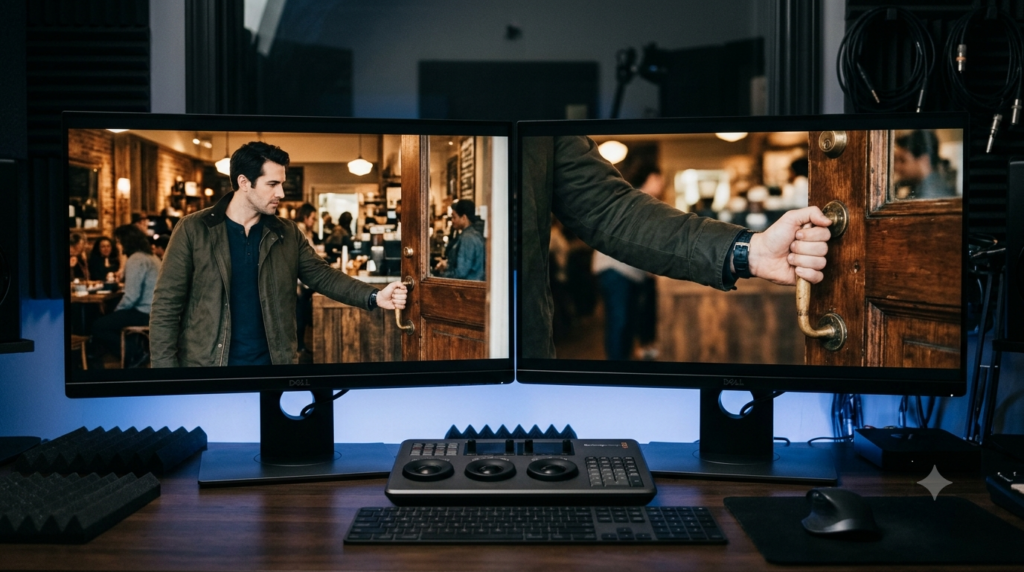
Continuity Editing: Screen Direction and Matching Action
Continuity editing makes separate film shots feel like one understandable scene. A person crosses a room, reaches for an envelope and opens a door. The camera may change position three times, yet the audience follows the same action without rebuilding the room in their mind.
The secret is not hiding every cut. Continuity editing protects the relationships that make each cut clear.
Two especially useful tools are screen direction and matching action. They answer different questions: where is someone moving, and what happens during the change of view?
What Is Continuity Editing?
Continuity editing is a way of arranging shots so viewers can follow action, screen space and story time across cuts. Editors match movement, direction and viewpoints while changing camera angles or shot sizes. The result feels coherent, even when the crew recorded those shots separately or out of order.
This does not mean each shot looks identical. Rather, a new angle gives the audience more information without making the scene’s basic geography collapse. A wide shot may show the whole room, while a close-up reveals a key in someone’s hand.
The Academy of Motion Picture Arts and Sciences’ film-editing teaching guide explains how screen direction helps identify continuous movement. It also describes matching a long shot of someone sitting to a closer view of that same action. Continuity editing links these ideas in practice. Those principles shape the examples below.
Continuity Editing at a Glance
- Screen direction: Preserve the apparent path and orientation of movement across related shots.
- Match on action: Cut during a gesture so the movement continues in the next view.
- Spatial orientation: Establish where people and objects sit in relation to one another.
- Story time: Keep the order and duration of actions understandable, even when some time disappears.
- Important limit: A smooth picture cut does not guarantee matching props, colour or sound.
How Screen Direction Keeps a Scene Clear
Screen direction means the way a person or object appears to move or face within the picture. If a cyclist travels from screen left to screen right, the next relevant angle should usually preserve that travel direction. Otherwise, viewers may think the cyclist has turned around.
Consider an invented scene beside a market. A courier rides towards a tea stall, moving left to right across the frame. The first shot ends as the bicycle leaves the right edge.
In the next shot, the cyclist enters from the left and keeps riding right. Although the background changes, the route still makes sense.
Now reverse the cyclist’s screen movement in the second shot without showing a turn. The viewer may assume the courier doubled back or that a different cyclist entered. This is a spatial problem in continuity editing, not a problem with the bicycle’s colour or the actor’s clothes.
Why the 180-degree guideline matters
The 180-degree guideline helps filmmakers preserve left-right relationships while changing camera views. Imagine an invisible line joining two speakers or following a moving subject. When cameras stay on one side of that axis, shots tend to preserve consistent screen positions and eyelines.
Suppose Asha sits on the left of a table and Dev sits on the right. From compatible camera angles, Asha looks towards screen right while Dev looks towards screen left. Their close-ups therefore feel like parts of the same conversation.
For continuity editing, the guideline is not a law. A camera move, a wider view or another clear reorientation can establish a new axis. What matters is whether the audience understands where everyone stands after the change.
How Matching Action Works Across a Cut
Matching action, often called a match on action, joins views of one movement so it appears to continue. The editor might cut from a wide shot of someone reaching for a bag to a close-up of their fingers taking the handle. The gesture connects the two angles.
Return to the fictional courier. In a medium shot, she extends her right hand towards the tea stall door. Just as her hand reaches the handle, the edit switches to a close-up.
Her fingers complete the same movement in the new shot. The cut changes the view, not the action.
In continuity editing, timing matters as much as direction. If her hand has already gripped the handle before the cut, showing it reach again creates repeated action. If the close-up begins after the door has swung open, the motion may seem to skip. Either choice can break the intended flow.
A simple frame-by-frame matching test
Look at the last moment of the outgoing shot and the first moment of the incoming shot. Compare hand position, speed, body angle and the phase of the gesture. Then play the cut at normal speed, because a match that looks plausible in still frames may feel awkward in motion.
You need not copy every frame exactly. Small overlaps or omissions can help the action feel natural. However, the viewer should perceive one uninterrupted reach, not two reaches or a missing step.
Continuity Editing Example: A Courier Enters a Café
This made-up sequence shows how several decisions work together. The courier wants to deliver an envelope to someone waiting at a café table. The editor has a wide exterior, a doorway close-up, an interior two-shot and two reaction shots.
| Shot | What viewers see | Continuity question |
|---|---|---|
| 1. Exterior | Courier walks left to right towards the door. | Is her travel direction clear? |
| 2. Handle close-up | Her right hand completes the reach and opens the door. | Does the gesture match Shot 1? |
| 3. Interior wide | She enters and approaches a person seated on the right. | Is the room’s geography easy to read? |
| 4. Reaction | The seated person looks towards the arriving courier. | Does the eyeline point to the established position? |
| 5. Envelope insert | Her hand offers the envelope above the table. | Does the handoff continue without a jump? |
Continuity editing succeeds here when the audience follows the delivery, not merely when each image looks attractive. Screen direction links the approach shots. Matching action joins the hand movements. The wider interior shot then resets the viewer’s understanding of the space before closer reactions.
Notice what the sequence does not demand. Every step from the street to the table need not appear. The editor can omit a dull stretch of walking if the remaining shots preserve a believable path and clear cause and effect.
How Eyeline Matches and Establishing Shots Help
Eyeline matching connects a character’s look to a compatible view of what they see. Suppose the courier pauses and looks up towards screen right. A cut to a person standing near the café window suggests that this is where her attention went.
The audience reads the relationship because previous shots established the room. If the new view contradicts that geography, the cut may suggest the person stands somewhere else. An eyeline match therefore depends on both gaze and location, not gaze alone.
Establishing shots can support continuity editing before close-ups take over. A broad image of the café door, counter and table provides a simple mental map. Later, the editor can return to a wider shot if an unusual angle leaves the viewer uncertain.
The Oklahoma State University open film-and-television textbook also explains the axis of action and consistent screen direction. Its account reinforces the basic point: camera placement and editing must work together.
What Continuity Editing Is Not
The word continuity covers several crafts, but they solve different problems. Keeping a mug in the same place during reshoots is not the same as making a moving hand connect across a cut. Similarly, correcting an uneven colour cast will not fix a reversed direction of travel.
| Craft or technique | Main question | Typical problem |
|---|---|---|
| Continuity editing | Can viewers follow movement, space and time? | A person seems to reverse direction. |
| Prop continuity | Are objects and their positions consistent? | A cup jumps between hands. |
| Colour matching | Do adjacent images fit the scene’s light? | A face flashes warmer at the cut. |
| J-cut or L-cut | When does incoming or outgoing sound cross the picture cut? | A voice starts early or continues later. |
Prop continuity and the script supervisor
Prop continuity tracks details such as an envelope’s position, a cup’s fill level and which hand holds a key. Departments keep records so later takes can match earlier ones. Movieshala’s film crew roles guide explains the script supervisor’s tracking role and how it differs from props work.
These details can affect continuity editing during a match on action. If the courier reaches with her right hand but the close-up shows her left, the edit exposes a prop or performance mismatch. Yet prop tracking remains a separate responsibility from selecting the picture cut.
Colour matching and shot continuity
Colour matching checks exposure, white balance and contrast across angles. The film colour grading guide shows why adjacent shots may need visual balancing even when their action matches perfectly.
In the café example, a warmer close-up might draw attention to the cut. That does not mean the courier changed direction or repeated her reach. Fix the image match and movement match as separate problems.
J-cuts, L-cuts and sound bridges
J-cuts and L-cuts change when audio arrives relative to the picture. An incoming voice may start before its speaker appears, or an outgoing voice may continue after the image switches. Movieshala explains both patterns in its J-cut and L-cut sound-bridges guide.
A scene can use a J-cut alongside continuity editing, but one technique does not cause the other. A sound bridge may ease a transition even as the visuals intentionally jump to another time or place.
How to Build Continuity Editing from Raw Footage
Good continuity editing starts with understanding the available shots. A script supervisor’s notes may help, but the editor still needs to watch the performances. For a short action scene, this order offers a useful working method rather than a rigid rule.
- Map the location. Identify entrances, exits, character positions and the axis of action in the wider shots.
- Choose a readable starting view. Show enough space to make the next close-up meaningful.
- Mark movement beats. Find the reach, turn, step or glance that can carry across angles.
- Align the action. Compare adjacent frames, then adjust the cut while watching at normal speed.
- Check screen direction. Confirm that movement and eyelines still fit the established geography.
- Review unrelated continuity. Flag mismatched props, lighting or sound for the relevant fixes.
- Watch without pausing. Ask whether a first-time viewer could explain who moved where and why.
Continuity editing cannot manufacture a missing reverse angle or a matching gesture from nothing. If the footage conflicts, the better fix may be a different take, a wider bridge shot or a shorter sequence. Do not force an elegant cut that makes the action impossible to follow.
When a Continuity Cut Feels Wrong
A confusing cut in continuity editing is easier to repair when you name the specific failure. Is the problem the screen path, the physical gesture or the viewer’s knowledge of the room? Those are different diagnoses, so they call for different edits.
The character seems to turn around
Check whether the new angle crosses the action axis or reverses apparent travel. If you have suitable footage, insert a neutral or wider view that explains the new orientation. Otherwise, consider another angle that preserves the direction already established.
The same action happens twice
Move the edit point so the gesture progresses rather than restarts. For example, the courier’s fingers should not reach the handle again after touching it in the previous shot. A different take may fit better when timing alone cannot fix the mismatch.
The viewer loses track of the room
Return to an establishing view or a clear reaction linking the positions. Then inspect eyelines and entrances before trimming again. More cuts are not always the solution, since each new angle creates another relationship the viewer must read.
When Breaking Continuity Editing Makes Sense
Continuity editing is a storytelling choice, not a command to make every transition invisible. Filmmakers may reverse a screen path, jump ahead in time or cut to an unexpected view for a specific effect. Confusion can express panic, surprise or a character’s limited knowledge.
However, a deliberate break works best when the surrounding scene provides a useful reference point. Imagine the courier hears a sudden crash inside the café. A sharp, disorienting cut may suit that shock. The next shot can then restore the room’s geography so viewers understand the consequence.
A jump cut is not automatically a mistake, and a match cut is not automatically a continuity cut. Some graphic matches link different places through shape or motion rather than continuous action. Adobe’s guide to match cuts distinguishes several ways that visual or sound links can shape an edit.
A Useful Continuity Editing Exercise
Take a simple fictional action: someone enters a room, picks up a book and hands it to a friend. Record a wide shot, a hand close-up and two compatible character angles. Keep the action safe and ordinary so you can concentrate on the cuts.
First, edit a version that keeps screen direction and hand movement consistent. Then swap the close-up for one filmed from the opposite side of the axis. Watch how that changes the apparent layout. Finally, delay the close-up until after the book has already left the table and compare how the action reads.
The Academy’s Teachers Guide Series recommends analyzing shot lists, movement direction and action matches. That is a practical way to study continuity editing. You can adapt that approach without using an existing film clip. Record which cut causes confusion, then describe exactly why.
The Bottom Line
Continuity editing gives the viewer a dependable path through changing images. Screen direction protects the scene’s geography, while matching action protects the flow of movement. Eyelines and wider views support both, especially when an editor moves between close-ups.
Start by checking what the audience can understand, not whether every cut is invisible. Then address prop continuity, colour matching and sound bridges on their own terms. A clear edit leaves more attention for the story.
Continuity Editing: Frequently Asked Questions
What is the main purpose of continuity editing?
Its main purpose is to keep action, time and space understandable across cuts. Viewers can follow a gesture or conversation even when shot sizes and camera positions change. The cut serves the scene rather than interrupting its basic geography.
What is screen direction in film editing?
Screen direction describes the apparent left-right movement or orientation of a subject inside the frame. Editors usually maintain it across related shots so viewers do not mistake continuous travel for a reversal. A visible turn or clear reorientation can justify a change.
What does match on action mean?
Match on action means cutting between two views of the same ongoing movement. For instance, a wide shot can show a hand starting to reach, while a close-up completes the reach. The physical action links the shots.
Is the 180-degree rule mandatory?
No. The 180-degree rule is a widely used guideline for preserving screen positions and eyelines. Filmmakers can cross the axis when the change is explained or deliberately disorienting. The real test is how viewers interpret the scene.
Is continuity editing the same as prop continuity?
No. Editing continuity mainly concerns the relationships among consecutive shots. Prop continuity concerns details such as object placement and which hand holds an item. Both can matter during the same cut, but they describe different work.
Does colour matching fix a bad continuity cut?
Not usually. Colour matching can prevent distracting brightness or white-balance changes between angles. It cannot repair reversed screen direction or a repeated gesture. First identify which aspect of the transition fails.
Are J-cuts and L-cuts types of continuity editing?
They are audio-picture timing methods that may support a smooth sequence. A J-cut introduces the next shot’s audio early; an L-cut extends previous audio past the picture change. Neither automatically preserves physical movement or screen geography.
Can continuity editing skip time?
Yes. Editors can omit an uneventful walk or pause while keeping the sequence understandable. A clear departure, destination and next action often tell viewers what happened between the cuts. Continuity is about legibility, not recording every second.