Graphic Match Cut: Linking Shots Through Shape and Composition
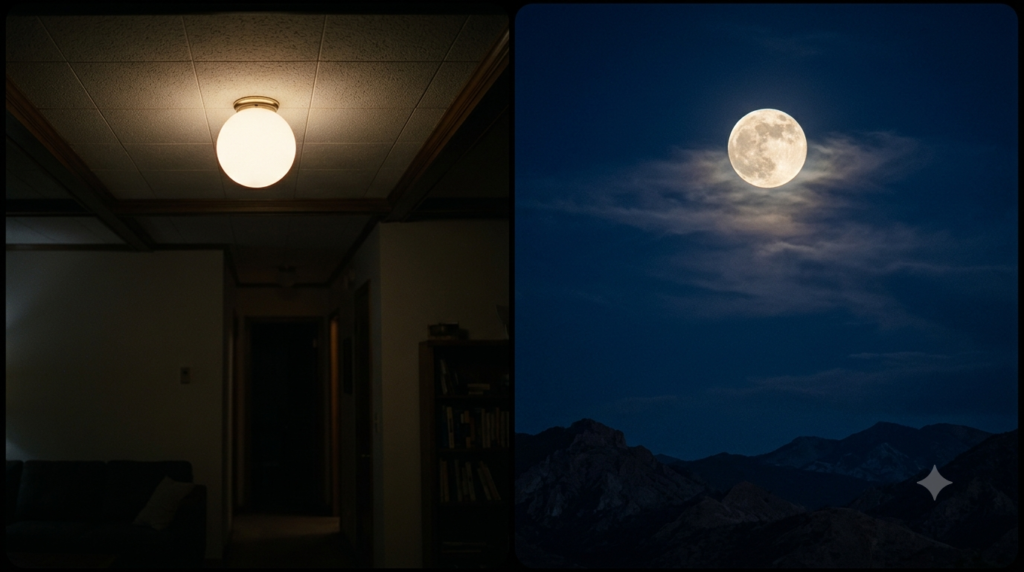
A graphic match cut links two film shots through a shared visual feature, even when their stories take place far apart. A round ceiling light might become a full moon. A square window might become a picture frame. The match gives viewers something familiar to follow while the scene changes beneath it.
The technique is not simply a pretty transition. Its strongest use is to make two otherwise separate images speak to each other. Here is how filmmakers build that link, with fictional scenes you can picture without watching a specific movie.
What Is a Graphic Match Cut?
A graphic match cut is an edit between shots that share a clear visual pattern, such as shape, colour, scale or composition. The matched elements draw the eye across the cut, although the images may show different objects, places or times. Filmmakers use that likeness to create flow, contrast or meaning.
Think of two drawings placed on top of each other. The stories may differ, yet one outline sits neatly over another. The cut makes that visual relationship apparent in a fraction of a second.
Adobe’s guide to match cuts describes graphic matching as a way to connect scenes through similar visual elements. The open film textbook Reframing Cinema also separates graphic matches from action matches and other forms of editing.
Graphic Match Cut at a Glance
- What matches: an outline, colour field, size, placement, balance or overall frame design.
- What can change: the subject, setting, character, time, camera distance or dramatic situation.
- Why it works: the eye recognises a visual likeness before it fully reads the new scene.
- What it can express: a link, a contrast, a joke, a memory or a shift in perspective.
- What it is not: a requirement that one action continue or that sound overlap.
The essential point is selection. A graphic match cut does not require every pixel to align. One strong, easy-to-read feature often does more work than five weak similarities.
How a Graphic Match Cut Uses Shape and Composition
Visual matching can happen at several levels. Some edits depend on a simple outline. Others rely on where the subject sits inside the frame. An editor can also use colour, brightness or repeated geometry to help the audience see the connection.
Shape: let one outline become another
Imagine a fictional scene in a small apartment. A child looks up at a circular ceiling light. The next shot shows a pale moon against a dark sky, occupying almost the same area of the screen.
The light and moon are unrelated objects, but their outlines connect. The cut may suggest wonder, distance or the child’s imagination. It does not mean the apartment and sky share one physical space.
A graphic match cut becomes easier to notice when the matched shapes have similar size and position. Still, a slight mismatch can feel alive rather than wrong.
Composition: match where the eye lands
Now picture a woman standing alone at the right edge of a railway platform. Cut to a narrow tree standing at the same edge of an empty field. Both frames leave wide, quiet space to the left.
This edit matches the arrangement of the whole image, not one exact object shape. The shared empty space may carry the feeling of isolation. Yet the cut also introduces a new setting, so the viewer sees the change.
Composition includes balance, direction, negative space and the position of important lines. An exact central match can feel controlled. An off-centre match can feel less obvious and more suggestive.
Colour and contrast: useful support, not the whole idea
A red paper lantern could cut to a red warning lamp. Similar colour helps the link register, especially when both objects fill much of the frame. However, colour alone can be too broad if the shapes and positions fight each other.
Imagine cutting from a tiny red button in the bottom corner to a huge red curtain across the screen. The hue matches, but the eye must search for the relationship. Reframing either shot could strengthen the intended rhyme.
Movement may also support a graphic match. For example, two different circular objects can turn in the same direction. Yet a visual resemblance is not the same as continuing one character’s action.
Three Fictional Graphic Match Cut Examples
The following examples are invented teaching scenes, not descriptions of existing films. Each pair illustrates a different storytelling job. The important question is not only what looks alike, but what the viewer understands after the cut.
Example one: a clock face becomes a bicycle wheel
A student stares at a large classroom clock while waiting for the final bell. Its pale face fills the centre of the frame. Cut to a bicycle wheel turning in the same position as the student rides through an open street.
The circular shapes supply the link, while the new setting signals release. A gentle change from stillness to movement can sharpen the contrast. The edit skips the ordinary steps between classroom and street without pretending they happened in one continuous shot.
Example two: a doorway becomes a theatre screen
A nervous actor stands before a tall, bright doorway. The next shot frames a glowing theatre screen with nearly identical edges. In both images, surrounding darkness makes the bright rectangle stand out.
Here, the graphic match cut suggests a threshold between private fear and public performance. The actor need not walk through the doorway on camera. The visual connection carries the idea without a spoken explanation.
Example three: a falling leaf becomes a paper letter
In a fictional family drama, a yellow leaf drifts across a dark pond. Cut to a yellow letter lying at a similar angle on a dark desk. The shapes need not match perfectly if their colour, scale and screen position work together.
That pairing may suggest an old memory returning. However, the letter gains meaning only when the story gives it weight. A beautiful match without a useful story connection risks becoming decoration.
Graphic Match Cut vs Match on Action vs Sound Bridge
These terms describe different things that can carry a viewer across an edit. A graphic match depends mainly on the picture’s visual design. Match on action depends on the flow of movement. A sound bridge depends on audio that connects or overlaps shots.
| Technique | What connects the shots | Fictional example |
|---|---|---|
| Graphic match cut | Similar shape or composition | Round clock cuts to bicycle wheel |
| Match on action | One gesture continues across angles | Hand reaches for cup, then grips it close-up |
| Sound bridge | Audio carries across the picture change | Train whistle continues over a city view |
For a closer look at continuous movement, see Movieshala’s continuity editing guide. It explains screen direction and matching action inside a readable scene.
Why matching action is a different promise
Suppose a cook lifts a pot in a wide shot. The edit moves to a close-up as the same lift continues. Viewers read one action from two angles, so timing and hand position matter.
Now replace that close-up with a round wheel on a moving cart. The wheel might resemble the pot’s rim, but the cook’s lift no longer continues. That could be an intentional graphic match cut rather than a continuity edit.
The difference matters when reviewing mistakes. An action match may fail because a gesture repeats. A visual match may work even when the characters and places have nothing in common.
Why a sound bridge is not a visual match
Picture a kettle whistling in a kitchen. Its sound continues as the image cuts to a bus pulling into a station. The audio links the settings although the pictures share no obvious design.
In a J-cut, incoming sound begins before the next picture. In an L-cut, outgoing sound continues after the picture changes. Movieshala’s J-cut and L-cut guide explains this timing in detail.
You can combine sound and graphic matching. A kettle’s round lid could cut to a bus wheel while the whistle continues. Yet each connection still does its own job.
How to Plan a Graphic Match Cut Before Filming
The simplest way to design this edit is to start with the story idea, then find the visual pair. Planning helps because the camera can place both images where the cut needs them. However, editors can sometimes discover strong matches in existing footage.
- Name the connection. Decide what the audience should feel or infer. Is the link about freedom, repetition, memory or irony?
- Pick the visual anchor. Choose one shape, edge, colour area or frame position that viewers can spot quickly.
- Draw both frames. Put the important feature in roughly the same screen location. Note its size and angle.
- Check the surrounding space. Background clutter can hide a match, so decide what belongs near the anchor.
- Plan the change. Work out which details should differ. Those differences create much of the cut’s meaning.
- Record safe alternatives. Shoot a wider framing and a tighter one if production allows. This gives the editor room to refine the pairing.
A storyboard can keep those choices visible across departments. The plan need not use exact measurements. It should reveal what the camera must protect for the edit to read.
Testing a Graphic Match Cut in the Edit
Start by placing the two selected clips next to each other as a straight cut. Do not add a dissolve just to hide an uncertain match. First, check whether the relationship works when both images meet directly.
Pause on the last frame of the outgoing shot and the first frame of the next. Compare the subject’s position, outline, scale and the brightest parts of the image. Then play the transition at normal speed, since a frozen pair can look stronger than the moving edit.
If the match feels weak, try a different frame or a modest reframing before changing the whole scene. A slight crop may help, but aggressive enlargement can damage image quality. Keep the viewer’s intended point of attention in mind.
Next, listen without looking. Sound may reinforce the idea or compete with it. A sudden musical accent can draw attention to the cut, while quiet ambience may let the visual connection speak for itself.
What if the two shots refuse to line up?
Do not force an exact overlay when it makes either image awkward. Instead, identify the strongest common feature and make that feature easier to see. A tighter crop, cleaner background or earlier cut point may solve the problem.
If the link still reads poorly, choose a conventional cut or another shot pair. The graphic match cut is not guaranteed to improve every transition. Clear storytelling matters more than protecting a clever idea from the storyboard.
What a Graphic Match Cut Adds to the Story
The visual rhyme can do more than smooth a location change. It can make a comparison without a narrator announcing it. When a child’s spinning toy cuts to a factory turbine, the likeness might suggest play becoming labour.
Notice the two layers of that example. The shared rotation makes the edit readable. The difference between toy and machine creates the thought. Therefore, the strongest match often depends as much on contrast as similarity.
It may also change how the audience remembers the first image. After seeing the turbine, viewers may reconsider the child’s toy as a hint of the future. This effect emerges from shot order, not from a hidden meaning inside either object.
There is another useful distinction: visual precision and emotional force are not identical. A slightly rough match with a strong story link may outlast a flawless shape match that says nothing. Editors should judge both.
Common Graphic Match Cut Mistakes
- Matching an object instead of an image. Two bicycles do not automatically make a graphic match if their frames look completely different.
- Ignoring screen position. A circle in the top corner may not read against one placed low and far right.
- Expecting a match to prove continuous time. Similar shapes can connect scenes separated by years or kilometres.
- Using a dissolve as a repair tool. Overlapping frames may soften the change, but it cannot supply a missing visual idea.
- Forgetting the surrounding scene. A visual rhyme can confuse viewers if they have no clue why the new setting matters.
- Chasing perfect colour. Matching hue can help, yet scale and composition may be more important.
A useful viewing test is to show the cut to someone unfamiliar with the plan. Ask what they noticed and what the two shots suggest together. Their answer may reveal a different reading from the one you expected.
How Graphic Matching Relates to Montage
A graphic match cut joins a particular pair of shots through visual resemblance. Montage concerns how a sequence of shots works through selection, order and juxtaposition. Consequently, a montage may contain several graphic matches, but it does not need any.
Imagine a fictional montage of someone learning to paint. Brushes, failed sketches and finished canvases show progress over time. A round paint palette cutting to a round studio window could add a graphic match within that wider sequence.
That single transition does not define the whole montage. For the broader distinction between time compression and meaning through shot order, read Movieshala’s film montage guide.
Graphic matching can also appear in continuity-driven storytelling. Still, it does not require the spatial or action consistency that continuity editing often seeks. One technique creates a visual relationship; the other keeps events easy to follow.
A Simple Two-Shot Practice Exercise
Use everyday objects and two short shots. First, film a round plate on a dark table with the plate near the centre. Then film a round wall clock from a similar distance and angle. Cut directly between the clips.
Make a second version where the clock sits near a corner. Compare both edits without sound. You will likely see why screen position matters even when the objects share the same outline.
Finally, replace the clock with a square notebook and ask whether the cut still communicates anything. The test separates visual resemblance from the mere fact that one shot follows another. It also gives you a small editing problem you can solve without effects.
The Bottom Line
A graphic match cut connects shots by the way they look, not by requiring the same action or sound. Shape, framing and contrast guide the eye, while differences in context supply the deeper meaning. Begin with a story connection, then design the images to carry it. If the visual match distracts more than it reveals, a simpler edit may be better.
Questions About Visual Matching
What is a graphic match cut in film?
It is a cut between shots whose visual features resemble each other. Shape, colour, frame position or composition can carry the connection. The objects and scenes do not need to share a place or time.
Is a graphic match the same as a match cut?
Not exactly. Match cut is a broader term for edits that connect shots through some shared feature. A graphic match is the visual-design version, while other matches may depend on action or sound.
Do both shots need the same object?
No. Two entirely different objects can share a strong shape or layout. A circular lamp and a moon, for example, can create a recognisable visual link without depicting the same thing.
What is the difference between a graphic match and match on action?
A graphic match links visual patterns across shots. Match on action continues a movement across camera views, so viewers perceive the same gesture carrying forward. One often connects ideas, while the other usually supports action continuity.
Can audio and picture matching work together?
Yes. Sound can overlap the picture change while the images match in shape or composition. The combination may make the transition feel more connected, but audio overlap is not required for the visual match.
Should every visual match feel smooth?
No. A match may be surprising or deliberately stark, even when the shared shape is easy to recognise. The editor can use that tension to connect contrasting places, times or ideas.
Do you need special effects to make one?
No. Careful framing and a straight edit are enough. Cropping and colour adjustments can help, although the basic visual relationship should remain clear without a morph or elaborate transition.
How does visual matching fit into montage?
It is an editing technique that can appear inside a montage. Montage describes meaning or time shaped through a sequence of shots. A graphic match describes the visual connection at a particular cut between shots.