Film Camera Movement: Pan, Tilt, Dolly and Tracking
Film camera movement changes what viewers see by turning the camera or moving it through a scene. A pan looks across a space, while a dolly carries the viewpoint into it. Those moves may look similar on screen, yet they tell different stories.
The important question is not which move looks impressive. It is what the audience should notice next.
Film Camera Movement at a Glance
Every camera move begins with a simple choice: should the viewpoint turn or change its physical position? Pan and tilt shots rotate the camera, while dolly and tracking shots carry it through space. Zooming changes the lens view instead. Actor blocking controls where performers stand and walk, not where the camera travels.
- Pan: Turn the camera left or right while its support stays in place.
- Tilt: Point the camera up or down without moving its base across the set.
- Dolly: Move the camera physically, often toward or away from a subject.
- Tracking: Travel through the scene, often alongside, ahead of or behind a subject.
- Zoom: Change focal length rather than move the camera through space.
- Actor blocking: Plan the performers’ positions, paths and pauses within the scene.
These terms describe different jobs, so a single shot can combine them. For example, a tracking camera may pan slightly to keep a walking actor framed. The distinction becomes clearer when you watch the background, not just the actor.
What Is Film Camera Movement?
Film camera movement is a change in camera direction or physical position during a continuous shot. The camera may pivot, move toward a subject or travel beside the action. Each choice controls when the viewer discovers information, how space feels and whose experience guides the scene. It does not require the actor to move.
Think of a person standing in a cinema foyer. A fixed camera can watch them cross the floor. A pan can follow them without changing position. A tracking shot can travel beside them, so the foreground and background shift as the camera moves.
The cinematography chapter in Moving Pictures separates actor movement within the frame from camera movement through a scene. That distinction matters because a busy image does not always contain a camera move.
Film Camera Movement: Rotation vs Travel
Rotation means the camera changes where it points while its base stays in roughly the same place. Travel means the camera’s position changes relative to the set. Both can reframe a subject, but travel can reveal new spatial relationships. A foreground post may slide past a distant doorway when the camera moves sideways.
| Technique | What changes? | Useful visual clue |
|---|---|---|
| Pan | Horizontal camera direction | The view turns left or right. |
| Tilt | Vertical camera direction | The view points up or down. |
| Dolly | Camera position | The camera moves closer or farther. |
| Tracking | Camera position along a path | Background layers shift during travel. |
| Zoom | Lens focal length | Framing tightens or widens from one position. |
| Actor blocking | Performer’s position | The actor moves, even if the frame stays fixed. |
The categories are not mutually exclusive. A camera can travel on a dolly and tilt upward in the same take. In that case, the shot contains both translation and rotation. Describe each component rather than treating the whole move as one vague label.
Pan: Turning the View Left or Right
A pan rotates the camera horizontally while its support remains in place. It can follow someone crossing a room or reveal a person waiting beyond the edge of the frame. Unlike a sideways track, the camera does not travel alongside the subject. The viewpoint turns, much like a person turning their head.
Suppose the frame begins on an empty ticket counter. It pans right to reveal a worried attendant. The delayed reveal gives the attendant’s presence meaning. A faster pan may create a sharp shift in attention, while a slow one allows anticipation to build.
Start and finish with purposeful compositions. Otherwise, the camera may drift after the reveal has landed. Adobe’s pan-shot guide also explains how speed and framing shape the effect.
Tilt: Turning the View Up or Down
A tilt rotates the camera vertically while the support stays in place. The lens may rise from a character’s shoes to their face, or look upward to reveal an overhead sign. Unlike raising a camera on a pedestal, tilting changes its angle rather than its position.
Imagine a character hearing a sound above the cinema seats. The camera tilts from their face to the projection window. This move connects an immediate reaction to its possible cause. A tilt can also highlight height, but the emotional effect depends on context.
Check the start and end frame before shooting. During a tilt, ceilings, lights or unwanted set details may enter view. A useful film camera movement needs a reason beyond showing that the camera can turn.
Dolly Shots: Moving Toward or Away From the Action
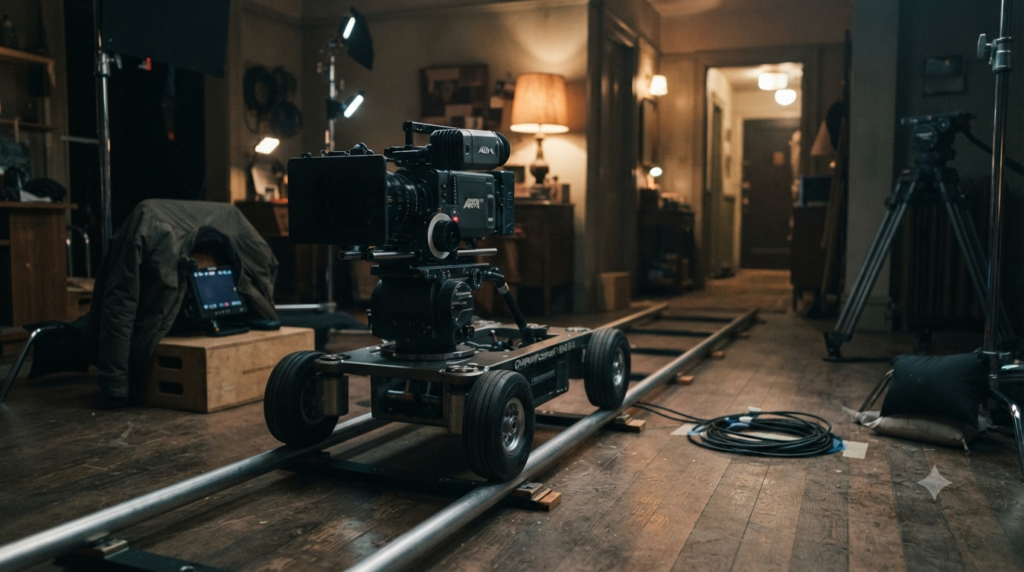
A dolly shot physically transports the camera, traditionally on a wheeled platform. The camera may push in toward a discovery or pull back to show isolation. Unlike a zoom, the camera changes its distance from the scene. That shift can alter the size relationships between near and far objects.
A slow push toward a character can narrow attention without cutting. Yet a dolly out may reveal the empty space surrounding them. These are storytelling choices, not fixed emotional formulas. A playful push-in can feel comic, while a retreat can reveal useful context.
Tracks are one way to achieve smooth travel, but crews also use dollies without rails. Movement should remain safe and repeatable. The Adobe guide to camera shots and angles covers dolly movement within a wider cinematography vocabulary.
Tracking Shots: Travelling With or Through a Scene
A tracking shot moves the camera along a route through the scene. It often follows an actor from the side, front or rear. The shot can also travel through an environment without following a person. In practice, filmmakers sometimes use tracking and dolly as overlapping terms.
The useful distinction is between the shot’s path and the equipment carrying it. Tracking describes travel through space. A dolly names a common camera platform and often the movement made with it. A gimbal or stabilised handheld rig can also achieve a travelling shot.
When a camera tracks sideways, nearby objects shift faster across the frame than distant ones. That changing perspective helps the audience sense depth. Adobe’s tracking-shot production guide stresses planning the actor’s pace, camera route and focus together.
Why a Zoom Is Not a Dolly Move
A zoom changes the lens’s focal length while the camera can remain stationary. A dolly changes the camera’s actual position. Both can make a face fill more of the frame, but they do not create the same perspective change. A dolly shifts the camera’s relationship to foreground and background objects.
To test this, place a person near a doorway with an object close to the lens. Shoot one take by zooming in from a fixed spot. Then shoot another by walking the camera closer while keeping the lens setting fixed. Compare how the nearby object moves relative to the doorway.
Parallax: The Background Clue
Parallax is the apparent shift between objects at different distances when the viewpoint moves. As the camera travels, a nearby chair can slide across a distant wall. A stationary optical zoom changes the scale of both without introducing that same viewpoint shift. This is the clearest practical clue.
A zoom can still serve a scene. It might isolate a clue with little room for camera travel. For a stronger perspective effect, filmmakers sometimes combine a dolly move with an opposite zoom. That specialised move is a dolly zoom, not an ordinary push-in.
Film Camera Movement vs Actor Blocking
Film camera movement controls the viewer’s changing viewpoint, while actor blocking controls the performers’ planned positions and actions. The camera may stay still as an actor crosses the frame. Equally, the camera may travel around an actor who never leaves their mark. Those choices must work together, but they are not identical.
Consider two versions of a confrontation. In the first, one actor walks toward another while the camera stays fixed. In the second, both actors remain still while the camera pushes toward the listener.
The first version changes the actors’ distance. The second changes the audience’s proximity without changing the performance’s geography.
Movieshala’s film blocking guide explains marks, rehearsal and actor paths. Use that separate plan before choosing a move. A camera route cannot rescue an unclear performance or an obstructed eyeline by itself.
A Fictional Shot Plan: The Last Cinema Ticket
Here is an invented scene, not a description of a real film. Nila enters a closed cinema foyer looking for her brother Ravi. She notices a folded note beside the ticket window.
Ravi appears behind her, but neither speaks. The camera’s job is to control what viewers learn and when.
The example uses six shots to isolate different decisions. The shot numbers describe the proposed edit order, not a mandatory shooting sequence. Every move has a start frame, an end frame and a reason.
| Shot | Camera and actor action | Story purpose |
|---|---|---|
| 1. Pan reveal | Camera pivots from the shuttered counter to Nila entering. Camera base stays fixed. | Introduce the empty foyer and then its visitor. |
| 2. Tilt up | Nila stops. Camera tilts from her gaze toward the dark projection window. | Link her reaction to a possible sound source. |
| 3. Dolly in | Nila stands beside the counter. Camera pushes toward the folded note. | Make the note the next point of attention. |
| 4. Side track | Nila walks along the counter while the camera travels beside her. | Keep her search continuous and show the foyer’s depth. |
| 5. Static hold | Camera stays still. Ravi enters the background and stops. | Let actor blocking deliver the surprise. |
| 6. Dolly out | Both actors stay still as the camera retreats. | Reveal the space separating them. |
Notice that shot five has action but no camera move. That contrast makes the lesson useful: movement in the image is not always film camera movement. The plan also avoids moving the camera simply because a scene has become tense.
Turn the Shot Plan Into Clear Instructions
For each take, write down the camera’s start and end marks, its direction of travel and the framing at both ends. Record where actors begin, cross and stop. Then decide what triggers the move: a footstep, a glance, a sound or a line.
On shot four, Nila’s first step could cue the side track. The camera operator follows the planned path while keeping a safe distance. If her timing changes, the camera team should rehearse again rather than chase unpredictably. In this film camera movement, the performance sets the rhythm.
Draw the two key frames for each moving shot, then connect them with a movement arrow. Movieshala’s film storyboard guide explains how panels, camera notes and shot order fit together. A storyboard shows the intended image; a floor plan shows where people and equipment can actually go.
How to Plan Film Camera Movement on Set
Film camera movement works best when the crew decides what the shot must communicate before choosing equipment. Start with the simplest viewpoint that expresses the beat. A static frame may be stronger than a long travelling move, especially when the actors’ timing carries the drama.
- Name the story beat. Decide whether the move reveals a clue, follows a person or changes emotional distance.
- Mark the start and end frames. Frame both compositions first, so the move has a clear destination.
- Separate camera and actor paths. Mark them differently on a floor plan to avoid confusion.
- Choose the move and support. Use a pan or tilt for rotation; choose safe camera travel when perspective needs to change.
- Rehearse timing and focus. Check pace, sharpness, eyelines, sound and any obstacles before recording.
- Record an alternative. Keep a clean static take or simpler move if complex travel proves unreliable.
Do not roll a chair, trolley or homemade camera platform across an unsafe floor. Moving equipment needs proper control and clear paths. If safe travel is unavailable, rework the shot as a pan, static composition or carefully chosen cut.
Common Film Camera Movement Mistakes
The most common error is naming a shot by its screen effect instead of the camera’s actual action. A subject growing larger is not proof of a dolly in. It could be a zoom, a moving actor or a combination. Watch the physical camera position before choosing the label.
- Calling every follow shot a pan: If the camera travels with the actor, describe the tracking movement too.
- Calling every track a dolly: The shot may use a gimbal, handheld rig or other support.
- Forgetting the finish frame: A smooth move still feels vague when it ends on an awkward composition.
- Confusing tilt with a camera rise: A tilt rotates upward; a pedestal or crane changes camera height.
- Moving without a motive: Movement can call attention to itself when no visual idea earns it.
A movement does not have to be invisible. Sometimes a sharp turn or conspicuous track is exactly the point. Still, the director should know whether viewers need clarity, surprise, discomfort or energy.
Try the Same Scene Three Ways
For a useful practice exercise, place a person near a doorway with an object in the foreground. Shoot the person walking across a locked-off frame. Then keep the person still and pan toward them. Finally, move the camera sideways past the foreground object while the person stays in place.
Review the clips without sound. Ask which take changes the actor’s position, which changes camera direction and which changes perspective. You will notice more than you would by memorising a list of shot names. Also check whether the movement adds information that a cut could deliver more cleanly.
Repeat the exercise with a fixed-position zoom. The difference between optical framing and camera travel should become visible in the foreground. A smartphone with only digital zoom may crop the image instead of changing optical focal length, so label that test accurately.
The Better Choice Is the Move the Scene Needs
Film camera movement is a way to direct attention, not a test of how much equipment a crew owns. Use pan and tilt when the viewer needs to look somewhere else. Use dolly or tracking travel when changing physical perspective serves the beat.
Keep zoom and actor blocking separate in your notes, even when they occur together. Then rehearse the entire shot from its first frame to its last.
Film Camera Movement: Frequently Asked Questions
What is the difference between a pan and a tracking shot?
A pan turns the camera left or right from a fixed position. A tracking shot carries the camera through space, often beside a moving subject. Both can follow an actor, but only the tracking movement changes the camera’s physical position. A shot may combine the two.
Is a dolly shot the same as a tracking shot?
The terms overlap, but they are not perfect synonyms. A dolly often refers to a wheeled camera platform or a movement made with it. Tracking describes the camera travelling along a route. A tracking shot can use equipment other than a dolly.
Is zooming a type of camera movement?
Zooming changes framing through focal length, rather than moving the camera’s position. Film lessons often group zooms with camera movements because the image changes during the shot. Technically, however, an optical zoom does not create the same change in viewpoint as a dolly.
Can actors move while the camera stays still?
Yes. An actor can walk, turn or enter the frame while a locked-off camera remains stationary. That action belongs to actor blocking, not camera travel. Keeping the camera still may help viewers notice a subtle change in performance.
Can one shot use a pan and a dolly together?
Yes. A camera may travel forward while panning to keep a subject inside the frame. The path changes the viewpoint, while the pan changes its direction. Record both movements in the shot plan so the crew can repeat the timing.
What does a dolly in do that a zoom cannot?
A dolly in moves the camera physically closer, changing perspective and the relative placement of objects at different depths. A stationary zoom changes their size in the frame without that same viewpoint shift. Neither is always better; the desired visual effect decides.
Do filmmakers need tracks for a tracking shot?
No. Tracks can support controlled camera travel, but other rigs can move through a scene. The key feature is the camera’s travelling viewpoint, not a specific set of rails. Whatever the support, the route needs safe movement and repeatable framing.
Should every dramatic scene have camera movement?
No. A fixed shot can give actors space and let a small gesture carry the moment. Move the camera when the change in viewpoint adds meaning or information. If it does neither, a simpler frame may be stronger.